
Track YouTube Metrics with YT Booster Tracker
Overview
YT Booster Tracker is a free desktop application designed to provide real-time access to YouTube channel metrics. Built as an authorized tool using the official YouTube API, it enables users to monitor key performance indicators directly from their desktop. The software is ideal for content creators, digital marketers, and small business owners who rely on YouTube analytics to evaluate content effectiveness and audience engagement. By selecting a specific channel within the app, users can view data such as subscriber count, view totals, video performance, and more—all pulled directly from YouTube’s public API.
The tool operates without requiring users to log in to a web browser or navigate through YouTube Studio. Instead, it offers a streamlined desktop interface that consolidates essential metrics in a clear, easy-to-read format. Data is processed locally on the user’s device, ensuring privacy and eliminating the risk of third-party data sharing. The developer emphasizes that no user data is stored or sold, and all information remains under the user’s control.
While the application does not generate reports or export data, it serves as a lightweight, no-frills dashboard for quick performance checks. It is particularly useful for creators who need immediate access to channel statistics during content planning, collaboration meetings, or performance tracking sessions. Its simplicity and focus on core metrics make it a practical choice for users seeking a straightforward way to monitor their YouTube presence without the complexity of full analytics platforms.
Key Features & Capabilities
- Real-Time YouTube Metrics Display – Access up-to-date channel statistics such as subscriber count, total views, video engagement, and watch time directly from the desktop.
- Official YouTube API Integration – The application uses the authorized YouTube API service, ensuring data accuracy and compliance with platform guidelines.
- Multi-Channel Selection – Users can switch between different YouTube channels within the app to monitor multiple accounts efficiently.
- Local Data Storage – All collected data is stored locally on the user’s device, enhancing privacy and security.
- Zero Data Sharing – The software does not send any user data to third parties or generate reports for external distribution.
These features allow users to track channel growth and content performance without relying on browser-based dashboards. For example, a content creator can quickly check if a recent video has gained traction by reviewing view counts and engagement metrics. A digital marketer managing multiple client channels can use the app to compare performance across accounts without switching between tabs or accounts.
Since the tool does not include advanced analytics or export functions, it is best suited for monitoring rather than in-depth analysis. However, its lightweight design and direct API integration make it a reliable companion for daily channel checks. The absence of advertisements or in-app purchases aligns with its free, utility-focused model.
User Interface, Workflow & Performance
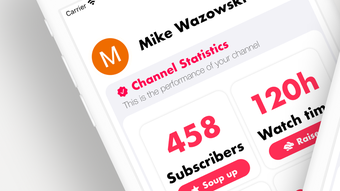
YT Booster Tracker features a clean, minimalistic interface designed for quick access to core metrics. The layout prioritizes readability, with channel data displayed in a structured format that avoids clutter. Navigation is straightforward, relying on a simple channel selection menu to switch between accounts. Users can initiate data retrieval with a single click, and the interface updates in real time based on API responses.
Workflow efficiency is high for users who need fast access to channel stats. The app does not require extensive setup or configuration—once the channel is selected, the data loads promptly. The developer did not specify resource usage details, but the 15 MB file size suggests a lightweight footprint. Performance observations are based on general software behavior patterns, indicating smooth operation on modern systems.
Stability appears consistent with the app’s limited scope. Since it only retrieves and displays data without processing or storing large datasets, the risk of crashes or freezes is low. The application does not consume significant CPU or RAM during idle periods, making it suitable for background use. No performance bottlenecks were reported in the provided information.
Compatibility & System Requirements
YT Booster Tracker is available for both Windows and Mac operating systems, supporting a broad range of desktop environments. The software has a file size of 15 MB, indicating a compact installation package suitable for devices with limited storage. The developer did not specify exact system requirements, so compatibility with older or newer hardware remains uncertain.
Platform compatibility information is limited, but the app’s lightweight nature suggests it should function on systems with standard configurations. No minimum processor, RAM, or storage requirements were listed. The developer did not provide additional system requirements, so users should ensure their system meets general desktop application standards.
Installation is expected to be quick and straightforward, given the small file size. The app does not require administrative privileges or background services to operate. It is designed to run as a standalone application, independent of browser sessions or internet connectivity after initial data retrieval.
Pros and Cons
Pros
- Free to use with no hidden costs or in-app purchases
- Official YouTube API integration ensures data accuracy and compliance
- Local data storage enhances privacy and security
- Lightweight design with minimal system resource usage
- Simple, intuitive interface for quick access to channel metrics
Cons
- No report generation or data export functionality
- Limited to basic metrics; no advanced analytics or trend visualization
- Exact system requirements were not provided
- Does not support mobile platforms
- Relies on YouTube API quota, which may affect availability under heavy use
FAQ Section
Is YT Booster Tracker safe to use?
The application uses the official YouTube API and does not store or share user data. All information remains on the user’s device, ensuring a secure experience.
Can I use YT Booster Tracker with multiple YouTube channels?
Yes, the app allows users to select and monitor multiple YouTube channels within the same interface.
Does the software require an internet connection?
Yes, an active internet connection is required to retrieve data from the YouTube API service.
Is there a license or subscription fee?
No, YT Booster Tracker is completely free to use with no subscription or licensing requirements.
Can I use the app offline after loading data?
While the app can display previously loaded data, it requires an internet connection to refresh metrics and retrieve updated information.
Final Thoughts
YT Booster Tracker delivers a focused, privacy-conscious solution for creators who need quick access to YouTube channel metrics. Its use of the official API, local data handling, and clean interface make it a reliable tool for daily monitoring. While it lacks advanced analytics and reporting features, its simplicity and zero cost position it as a valuable utility for content creators and small teams.
For users seeking a lightweight, secure way to track channel performance without the overhead of full analytics platforms, this tool offers a practical alternative. It excels in ease of use, privacy, and direct access to core data.
Download YT Booster Tracker now







